

LEMP 是由四个开源软件组件组成的集合,它们共同用于在互联网上托管网站。在 LEMP 堆栈中,L 代表 Linux 操作系统,E 代表 Nginx Web 服务器,M 代表 MariaDB/MySQL 数据库服务器,P 代表 PHP 编程语言。由于 LEMP 堆栈中的所有组件都是开源的,因此它被广泛应用于 Web 上高度可扩展的应用程序。
在本文中,我们将向您展示如何在 Oracle Linux 8 上安装 LEMP 堆栈。
步骤 1 – 在 Oracle Linux 8 上安装 Nginx Web 服务器
Nginx 是 LEMP 堆栈的第一个组件。默认情况下,Nginx 软件包包含在 Oracle Linux 8 默认存储库中。您可以使用以下命令安装它:
dnf install nginx -y
安装 Nginx 后,启动 Nginx 服务并使其在系统重启时启动。
systemctl start nginx
systemctl enable nginx
您还可以使用以下命令验证 Nginx 的状态:
systemctl status nginx
要验证 Nginx 版本,请运行以下命令:
nginx -v
您应该看到以下输出:
nginx version: nginx/1.14.1
现在,打开您的Web浏览器并输入URL http://your-server-ip。您应该在以下屏幕上看到Nginx默认页面: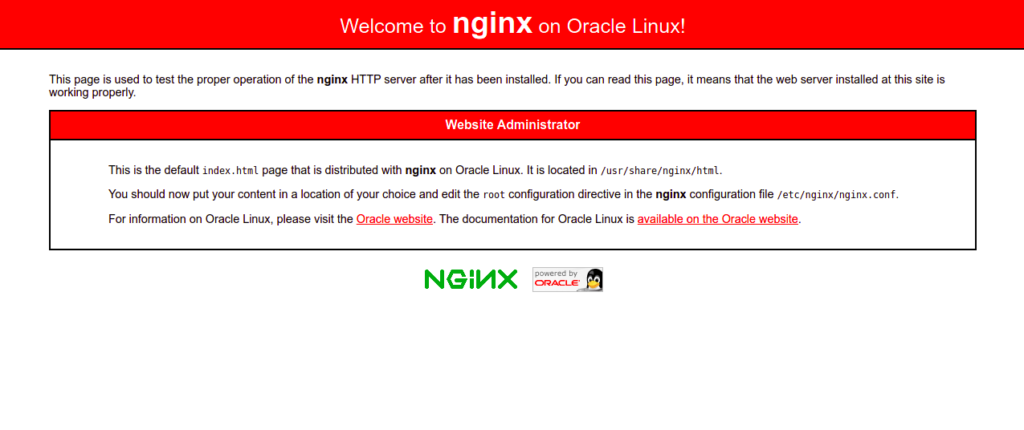
另请阅读
如何在 Oracle Linux 8 上安装和配置 Nginx Web 服务器
第 2 步 – 在 Oracle Linux 8 上安装 MariaDB 数据库服务器
MariaDB 是一个用于存储网站内容的开源数据库服务器。默认情况下,MariaDB 包含在 Oracle Linux 8 默认存储库中。您可以使用以下命令安装它:
dnf install mariadb-server mariadb -y
安装 MariaDB 后,启动 MariaDB 服务并使其在系统重启时启动:
systemctl start mariadb
systemctl enable mariadb
您可以使用以下命令检查 MariaDB 的状态:
systemctl status mariadb
您将获得以下命令:
● mariadb.service - MariaDB 10.3 database server
   Loaded: loaded (/usr/lib/systemd/system/mariadb.service; disabled; vendor preset: disabled)
   Active: active (running) since Sat 2022-06-11 00:46:12 EDT; 6s ago
     Docs: man:mysqld(8)
           https://mariadb.com/kb/en/library/systemd/
  Process: 27020 ExecStartPost=/usr/libexec/mysql-check-upgrade (code=exited, status=0/SUCCESS)
  Process: 26883 ExecStartPre=/usr/libexec/mysql-prepare-db-dir mariadb.service (code=exited, status=0/SUCCESS)
  Process: 26859 ExecStartPre=/usr/libexec/mysql-check-socket (code=exited, status=0/SUCCESS)
 Main PID: 26988 (mysqld)
   Status: "Taking your SQL requests now..."
    Tasks: 30 (limit: 11409)
   Memory: 80.0M
   CGroup: /system.slice/mariadb.service
           └─26988 /usr/libexec/mysqld --basedir=/usr
您还可以使用以下命令验证 MariaDB 版本:
mysqladmin-V
您应该看到以下输出:
mysqladmin Ver 9.1 Distrib 10.3.32-MariaDB, for Linux on x86_64
现在,您需要保护 MariaDB 安装。您可以使用以下命令来保护它:
mysql_secure_installation
您将被要求设置 root 密码,如下所示:
Enter current password for root (enter for none):
OK, successfully used password, moving on...

Setting the root password ensures that nobody can log into the MariaDB
root user without the proper authorisation.

Set root password? [Y/n] Y
New password:
Re-enter new password:
Password updated successfully!
Reloading privilege tables..
 ... Success!
接下来,您将被要求删除匿名用户,如下所示:
By default, a MariaDB installation has an anonymous user, allowing anyone
to log into MariaDB without having to have a user account created for
them.  This is intended only for testing, and to make the installation
go a bit smoother.  You should remove them before moving into a
production environment.

Remove anonymous users? [Y/n] Y
输入 Y 并按 Enter 键。系统将要求你禁止远程 root 登录:
 ... Success!

Normally, root should only be allowed to connect from 'localhost'.  This
ensures that someone cannot guess at the root password from the network.

Disallow root login remotely? [Y/n] Y
输入 Y 并按 Enter 键。系统将要求您删除测试数据库:
 ... Success!

By default, MariaDB comes with a database named 'test' that anyone can
access.  This is also intended only for testing, and should be removed
before moving into a production environment.

Remove test database and access to it? [Y/n] Y
按 Y 并按 Enter 键。系统将要求您重新加载权限表:
 - Dropping test database...
 ... Success!
 - Removing privileges on test database...
 ... Success!

Reloading the privilege tables will ensure that all changes made so far
will take effect immediately.

Reload privilege tables now? [Y/n] Y
输入 Y 并按 Enter 键以保护 MariaDB。
.. Success!

Cleaning up...

All done!  If you've completed all of the above steps, your MariaDB
installation should now be secure.

Thanks for using MariaDB!
另请阅读
第 3 步 – 在 Oracle Linux 8 上安装 PHP
默认情况下,Oracle Linux 8 主存储库中不提供最新版本的 PHP,因此您需要将 EPEL 和 Remi PHP 存储库添加到您的系统中。
您可以通过运行以下命令来添加它们:
dnf install epel-release -y
dnf install dnf-utils http://rpms.remirepo.net/enterprise/remi-release-8.rpm
现在,在以下输出中列出所有可用的 PHP 版本:
dnf module list php
您将在以下输出中看到所有可用的 PHP 版本:
Safe Remi's RPM repository for Enterprise Linux 8 - x86_64                                                    1.8 MB/s | 2.1 MB     00:01
Oracle Linux 8 Application Stream (x86_64)
Name                     Stream                        Profiles                                      Summary
php                      7.2 [d][e]                    common [d], devel, minimal                    PHP scripting language
php                      7.3                           common [d], devel, minimal                    PHP scripting language
php                      7.4                           common [d], devel, minimal                    PHP scripting language
php                      8.0                           common [d], devel, minimal                    PHP scripting language

Remi's Modular repository for Enterprise Linux 8 - x86_64
Name                     Stream                        Profiles                                      Summary
php                      remi-7.2                      common [d], devel, minimal                    PHP scripting language
php                      remi-7.3                      common [d], devel, minimal                    PHP scripting language
php                      remi-7.4                      common [d], devel, minimal                    PHP scripting language
php                      remi-8.0                      common [d], devel, minimal                    PHP scripting language
php                      remi-8.1                      common [d], devel, minimal                    PHP scripting language
现在,使用以下命令重置默认 PHP 模块并启用 PHP 版本 8.1:
dnf module reset php
dnf module enable php:remi-8.1
接下来,使用以下命令安装 PHP 和其他所需的扩展:
dnf install php php-fpm php-gd php-mysqlnd php-cli php-opcache -y
接下来编辑PHP-FPM默认配置文件,将用户从apache改为nginx:
nano /etc/php-fpm.d/www.conf
更改以下几行:
user = nginx
Group = nginx
保存并关闭文件,然后启动 PHP-FPM 服务并使其在系统重启时启动:
systemctl start php-fpm
systemctl enable php-fpm
第 4 步 – 使用 Nginx 创建示例网站
在本节中,我们将向您展示如何使用 Nginx 虚拟主机托管一个简单的网站。首先,创建一个目录来存储网站内容:
mkdir -p /var/www/html/website
接下来,使用以下命令更改网站的所有权和权限:
chown -R nginx:nginx /var/www/html/website
chmod -R 755 /var/www/html/website
接下来,使用以下命令创建一个简单的 PHP 页面:
nano /var/www/html/website/info.php
添加以下 PHP 代码:
<?php
phpinfo();
?>
保存并关闭文件,然后创建Nginx虚拟主机配置文件:
nano /etc/nginx/conf.d/website.conf
添加以下行:
server {
    listen  80;

    server_name website.example.com;

    location / {
        root  /var/www/html/website/;
        index  info.php;
        try_files $uri $uri/ =404;
    }

    error_page  500 502 503 504  /50x.html;
    location = /50x.html {
        root  /usr/share/nginx/html;
    }

location ~ \.php$ {
        fastcgi_split_path_info ^(.+\.php)(/.+)$;
        fastcgi_pass   unix:/run/php-fpm/www.sock;
        fastcgi_index  info.php;
        fastcgi_param  SCRIPT_FILENAME $document_root$fastcgi_script_name;
        include        fastcgi_params;
    }

}
保存并关闭文件,然后编辑Nginx主配置文件:
nano /etc/nginx/nginx.conf
在 http { 行后添加以下行:
server_names_hash_bucket_size 64;
保存并关闭文件,然后使用以下命令验证 Nginx 配置:
nginx -t
您应该看到以下输出:
nginx: the configuration file /etc/nginx/nginx.conf syntax is ok
nginx: configuration file /etc/nginx/nginx.conf test is successful
接下来,重新启动 Nginx 服务以应用配置:
systemctl restart nginx
第 5 步 – 验证 Nginx 网站
现在,打开你的网页浏览器并输入 URL http://website.example.com。你应该会在以下屏幕上看到 PHP 页面: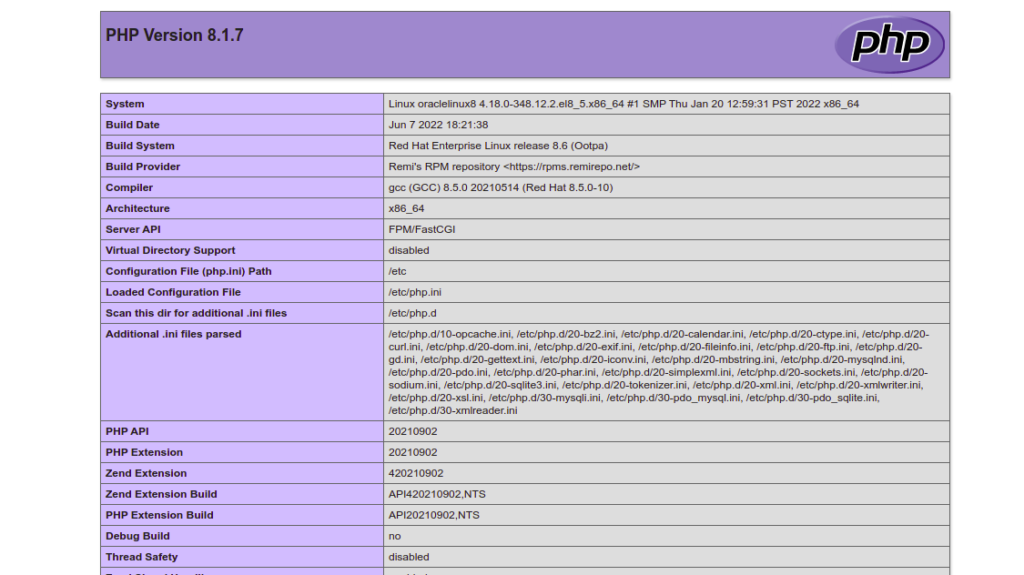
结论
在本文中,我们学习了如何在 Oracle Linux 8 上安装 LEMP 服务器。现在,您可以使用 Nginx 虚拟主机功能在一台机器上托管多个网站。不妨在Atlantic.Net 的VPS 主机上试用一下!